

Zip Mac Files for the PC Utility FAQs
(Updated 11/13/2014)
- Permission Denied In Mojave
- Hey! Why aren't my zipped files any smaller?
- How do I use Zip Mac Files For PC? (overview)
- Do you have a screenshot of the app?
- What Do the ZipFiles4PC Options do?
- I can't get the zip Mac files free trial to work!
- I paid for ZipMacFiles4PC, but can't get the download...
- How does the Password Protected Zip File Feature Work?
- What is your refund policy?
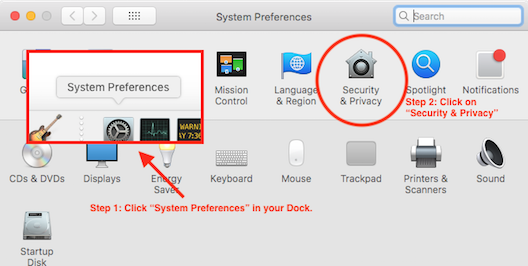
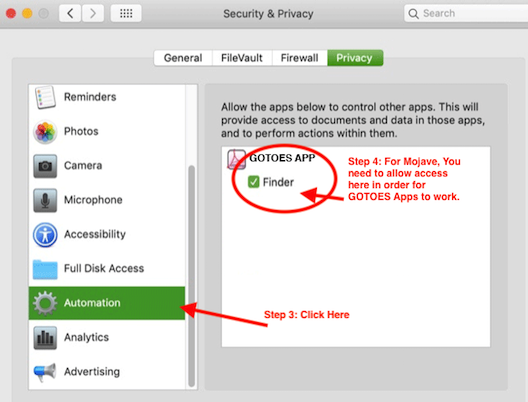
Why is Permission Denied In Mojave?
Mojave has increased security, so the first time you startup one of our apps on Mojave, you will need to grant it permissions to system events. If you did not do that on the first startup, please follow these steps:
How do I use Zip Mac Files For PC?
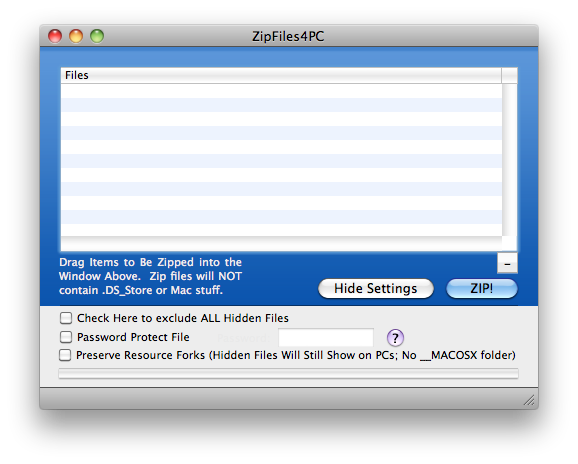
Simply drag and drop files and / or folders that you want to zip / compress onto the program icon. The program will open up with all of these files / folders loaded. Alternatively, you can double click the application to open it, and then drop files and folders that you want to zip / compress into the main window to load them. Once everything is loaded, click "ZIP!", specify a destination, and your zip file will appear!:
Do you have a screenshot of the app?
What Do the ZipFiles4PC Options do?
- If you don't check any options, your zip files will have the ".DS_Store" files excluded only.
- If you check "Check Here to Exclude ALL Hidden Files, your zip file will not contain any files that start with a "." (sometimes called "dot files") These files are usually invisible on a Mac, but generally show up on other operating systems. The Mac uses these "dot files" to store certain information.
- If you check the "Password Protect File" option, ZipFiles4PC will prompt you to supply a password to protect your zip file. There are some caveats, however, with opening these files on various operating systems (see below).
- Some files on the Mac also have two parts. These parts are called "data forks" and "resource forks." When you create a zip file using the built in tools on the Mac, the resource forks will be sequestered into a folder called "__MACOSX". On operating systems other than Mac, resource fork files usually start with "._" or "._.". There is usually one of these files for every file in the original folder. Sequestering the resource forks may be useful to most people, as it gets the resource fork files "out of the way," but for some people who are uploading to a server, the inconvenience of having an additional folder (__MACOSX) is troubling. If you are one of those people, check this box, and your files will still be 100% compatible with your Mac, and they won't have the extra __MACOSX folder.
I can't get the zip Mac files free trial to work!
As a Mac user, you are probably used to being able to name your files and folders with any characters you want. Our friends in the PC world, however, have many limitations placed upon them when it comes to characters. The Zip file for PC utility will not create a zip file if the files within contain names that will not work on a PC. Typical "problem" characters are forward slash (/) and space ( ).. though other characters may cause a problem as well. If you're having a problem with the app that you did not have before, it is possible that you received an incomplete install. Although rare, it has happend. To fix the issue, please delete ZipMacFiles4PC from your computer, restart the computer, and then re-download and install the app from your download link. This should fix the issue.
I paid for ZipMacFiles4PC, but can't get the download...
After you finish with PayPal you should get an email with a download link within 1 to 5 minutes - never longer. If you do not see the link in your inbox, please CHECK YOUR JUNK MAIL. If you still don't see it, make sure that you are checking the right email address (the one you have registered with PayPal). If you are still having trouble, you can contact us using the "Contact Us" link above. We can e-mail the software to you manually if you didn't get the download. Please keep in mind that this process might not be instant. Usually, we will respond to your e-mail within minutes, but sometimes it can be longer.
How does the Password Protected Zip File Feature Work?
Creating Password Protected Zip files all depends on your OS (operating system). If you are using Tiger (10.4) or earlier, you are not able to create Password protected zip files. If ZipMacFiles4PC is running on a Tiger or earlier machine, it will not display the password protect option box. If you are using Leopard (10.5) or Snow Leopard (10.6), the option will display - however You will need special software to open the zip file on your Mac! The password protected zip files will open on Windows machines with no problem (XP or later), but if you want to open the password protected zip files on your Mac, you will need to get special software. Leopard and Snow leopard will tell you that the file is "corrupted" (which isn't exactly the case). If you are using Lion (10.7) or Mountain Lion (10.8), you will have no problem creating or opening password protected zip files.
What is your refund policy?
Unfortunately, we cannot offer refunds. We offer a free trial so you can determine if the software is compatible with your operating system. Please try our free demo before you buy. If you have any questions, please use our support form to get your questions answered before you purchase.
Why aren't my zipped files any smaller?
Sometimes you find that not all file types will get smaller when zipped! Before we answer the question, we need to discuss the different types of compression that programs use to make your files smaller. There are two categories of compression available to reduce file size: lossy and lossless compression. If you've used computers for any length of time, you've probably witnessed both.
Lossy Compression: Maybe you have noticed thumbnail images online - like a friends profile picture for example - and you noticed that they are hard to see. When you zoom in, they get pixelated or blurry looking. The original image was clear and easy to see, but the thumbnail isn't as good. What has happened here is that lossy compression has been applied. With lossy compression, data has been discarded to make the file size smaller. That data is gone; basically, the neighboring pixels have been merged. This is a great way to make files smaller when the discarded information is not important. People are willing to accept tiny thumbnail images. Another example of lossy compression is an MP3 file - the algorithm for generating MP3s discards a lot of the available sound that the human ear cannot easily detect anyway. It's OK to discard this information to make the file smaller.
Lossless Compression: The other type of compression commonly used is lossless compression. This is the type of compression we use in ZipMacFiles4PC. Lossless compression does not discard any information. Instead, this type of compression looks for redundancies within the file, and combines them. For example, in the sentence, "Necessity is the mother of invention, therefore all good things must come to an end." you can see that the pair of letters "th" appears 4 times. So, rather than save 2 bits of information "t" and "h," we can just create a dictionary that says "th" equals 1. So, now our sentence is "Necessity is 1e mo1er of invention, 1erefore all good 1ings must come to an end." By doing this, we have saved 4 letters! If you do this enough times and discover enough patterns, you can make a file much smaller. Later on, we just use the dictionary to decode the file when we expand it! One issue with a small sentence like this is that we also need to save the dictionary. So, if we include the information that "th=1", we aren't really saving any bits... we saved 4 bits by translating the pattern to one, but it cost us 4 bits by adding the dictionary. The good news, though, is that with a larger file, the more this pattern is repeated, the more likely we are to save file space!
Thanks for the lesson, so, why aren't my files getting smaller? Since we cannot apply lossy compression (we don't want to throw away our customers' data), we must use lossless compression. We aren't the first company who discovered compression, and certain file types now-a-days are already optimized for size efficiency. In the example above, we talked about MP3 files. The MP3 algorithm was created with size efficiency in mind. Therefore, not only do they discard data (lossy compression), but they also minimize the redundancies to make the files as small as possible. ZipMacFiles4PC might be able to find some additional redundancies, but often we are rarely able to reduce this type of file by more than 1%. Conversely, text files can often be reduced by 50% to 80%! As you can see, it really depends on the nature of the file you are starting with!
So if ZipFiles4PC can't shrink my files, what good is it? Zipping files is actually a two step process. The first step is to "package" or "bundle" multiple files into one single file. The second step is to compress this single file. If you need to upload a thousand files to a website, often it would be extremely time consuming to select 1000 files individually and upload them. If you zip them all into a single file, you can just upload that one file. Another feature that differentiates ZipFiles4PC is the ability to strip hidden files that wreak havoc on PCs. For example, one of our main customers often uploads batches of DNA sequence files to their customers who use automation software to process ZIP files. The customers are using PCs, and originally they sent them files that were zipped using the built in Mac compression feature. Unfortunately, the customer's computers could not process the files because they were expecting Zip Files that had been created on PCs - not Macs. Rather than ask the customers to rewrite their programs, they use ZipFiles4PC to solve the issue. Their customers did not need to change anything on their end, and ZipFiles4PC is an infinitesimally small investment when compared with the huge revenue generated by these sequencing projects.
Page Last modified: February 24, 2019
Buy Zip Mac Files For PC ↓
Download a Free Trial 
Supported OSs:
Big Sur (11.0) end-of-lifeCatalina (10.15) 64-bit
Mojave (10.14)
High Sierra (10.13)
Sierra (10.12)
El Capitan (10.11)
Yosemite (10.10)
Mavericks (10.9)
Mountain Lion (10.8)
Lion (10.7)
Snow Leopard (10.6)
Leopard (10.5)
Tiger (10.4)
Panther (10.3)
Zip Mac Files For PC:
The Zip Mac Files For PC software is available for immediate download after purchase. Once you have completed your transaction on PayPal's website, return to GOTOES.ORG to obtain the Zip Mac Files For PC software. A link is also sent by email. If you do not get the email, check your junk mail filter! The Zip Mac Files For PC program is compatible with Mac OS X up to Big Sur. Our free trials are full featured. The only limitations are the number of items you can process.